Things You Need To Know
3D Modeling Class:
Female Character Model in All Quads:
http://www.3dm3.com/tutorials/female_body/index2.php
New 3D Max 8 Workflow for Animation 1&2 and 3D Modeling:
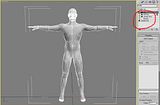
Warning for Animation 2 students: You must delete the Skin Modifier from the stack before you add the UVunwrap otherwise Max 8 will crash everytime due to a bug in Max.
After you have an Editable Poly for your male and/or female character you can then lay down a Morpher from the modifier list. After that you can lay down a UVunwrap and then you can throw down an Edit Poly Modifier from the Stack New to Max 8 along with the new UVunwrap which is not the same as the old UVunwrap in 6. Once in Edit Poly you can do M-Smooths which will allow you to divide the mesh to a higher detail level than previously possible. This will allow you to also gain access to the morph targets from the stack below transfering up to the more detailed model above eliminating much of your work needed for creating a whole bunch of new Morph Targets for the high res detail model and/or makes it much easier to just detail up a 2nd set for high poly morph targets because most of the work has already been done. With these edit polys it is possible now to sculpt on a low subdivision surface and affect the higher subdivision surface. Also this allows you to create one set of skin targets for both low poly and high poly models. So this new workflow I have just come up with really saves the Character Animation people a lot of work. :) ;) If you have further questions about this workflow email me or come see me or wait till class and ask all the questions that you want.
3D Animation 1&2 and 3D Modeling Class. So this is for Facial Animation and modeling. Its a website that shows you all of the facial expressions along with the muscles and bones to go along with it. Remember the muscles of the face are different from the rest of the body in that they are directly connected to the skin. You Will find this very useful for finishing their facial Morph Targets and others are still just starting.
Facial Muslces and Expressions.
http://www.artnatomia.net/uk/index.html
For Animation 2 and 3D Modeling Class:
Max Environment Builder:
http://www.highend3d.com/news/software/40.html
For Animation 1 Rigging How To:
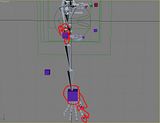
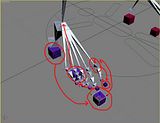
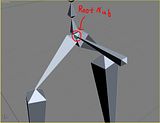
The circles are the parents and the arrows go to the child for the relationships. Remember that you drag the connect tool from the child to the parent when setting up relationships.
For Students that have never had me as their instructor:
Max Environment Builder:
http://www.highend3d.com/news/software/40.html
ZBrush Addons and Models:
http://206.145.80.239/zbc/showthread.php?t=020709
http://206.145.80.239/zbc/showthread.php?t=029628
http://206.145.80.239/zbc/showthread.php?t=030015
http://206.145.80.239/zbc/showthread.php?t=029789
http://206.145.80.239/zbc/showthread.php?t=003721
http://206.145.80.239/zbc/showthread.php?t=003471
The Homework www.3dbuzz.com 3D Studio Max issues 1-6. You must sign up for a user name and this process is free. Then click on the downloads section, and say I agree to the conditions page. Then on the left you will see an icon that says 3DS Max. Click on the icon and download all the videos from issues 1-6 or burn them off from CD from the lab from our file server at \\071fs\C-Share\MM Files\Movies Then go to the 3D Max folder and burn off all of the video tutorials to about 7 CDs. Unzip them with winrar and watch them with the Xvid Divx codec. You can use Microsoft Media Player to watch the videos.
You will need XVid to watch the 3D Buzz Videos:
http://download.divxmovies.com/XviD-1.0.3-20122004.exe
You will need Win Rar to unzip the 3D Buzz Videos:
http://www.rarlab.com/rar/wrar350.exe
HDRI 3D Studio Max Tutorial:
http://www.xedium3d.com/tutorials/hdri/hdri.html
HDRI Images:
http://hdri.3dweave.com/library/
http://www.debevec.org/Probes/
3D Studio Max User Forum:
http://forums.facepunchstudios.com/showthread.php?p=354782&highlight=lounge#post354782
3D Studio Max Demo Videos:
http://usa.autodesk.com/adsk/servlet/item?siteID=123112&id=5903856
http://usa.autodesk.com/adsk/servlet/item?siteID=123112&id=5663188
http://usa.autodesk.com/adsk/servlet/item?siteID=123112&id=5659402
Free ZBrush Videos:
http://pixologic.com/zbrush/class/classroom.html
Good Animation Videos:
http://www.rsad.edu/portfolio/ca.php
Links:
www.cgtalk.com
www.cgchannel.com
www.highend3d.com
www.3dbuzz.com
www.thegnomonworkshop.com
www.digital-tutors.com
www.3dtutorial.com
www.simplymaya.com
www.simplylightwave.com
www.alias.com
www.autodesk.com
www.softimage.com
www.pixelogic.com
www.newtek.com
www.sidefx.com
www.odforce.net
www.visualparadigms.com
www.xsibase.com
www.deviantart.com
http://www.thedesignworld.com/
Good art books for concept character art and also they are wonderful for 3D Modeling, Texture Painting, and Rigging.
1 An Atlas of Anatomy for Artis $10.36 1
1 Drawing the Human Head $13.57 1
1 Dynamic Anatomy $15.72 1
1 Dynamic Figure Drawing $13.57 1
1 Dynamic Wrinkles and Drapery $15.30 1
1 The Figure in Motion $13.57 1
1 Artistic Anatomy $15.72 1
1 Drawing Dynamic Hands $13.57 1
1 The Artist's Complete Guide t $22.05 1
Reference for Human Anatomy:
http://www.reybustos.com/04er/er.html
http://www.reybustos.com/03ra/ra.htm
Spore the First Fully Procedural Game:
I had this sent to be by some industry friends of mine. This was shown off at the GDC aka Game Developer Conference. Looks like it is the first fully procedural game. Really really amazing stuff. Also looks like he has a bunch of artifical life coding which is a branch of AI Artifical Intellegence. Very very cool. Massive that was used for Lord of the Rings had a lot of Artifical Life in it with generations and what not for all the crowd simulations of the orcs and other creatures and people. Check out this game video its about 35 minutes long it will blow your mind. :) ;)
http://video.google.com/videoplay?docid=8372603330420559198&q=spore
New game engine being developed in GA that is for entry level game developers and up. It has 0 setup costs which is wonderful and unheard of. You have to understand that most game engines cost $1,000,000 to use and on the low side VirTools at $100,000. So it costs a bit of money to make a game normally. Kaneva is different you get paid royalities on your games that you make with their engine and you can even sell them on their site which is very nice. Max is fully supported along with Blender, Maya, and Lightwave.
http://www.kaneva.com/overview/KEPEditor.aspx?ttCat=create&subtab=myg
http://www.kaneva.com/create/create.kaneva
Below is the link to how to move models and the UV Mapping from your low poly character into zbrush from max and from zbrush into max. I think what we are going to do is just throw down a displacement modifier and just use the normal mapping for the surface shading in addition to the displacement mapping. That should give us a pretty good look. Students not using ZBrush will just have to rely on Normal Mapping for the higher detailed characters so we just won't get the range that we had hoped for with Max 8 do to way too many bugs with the Poly Edit modifier. People that use ZBrush can do the facial animation shapes in ZBrush and export them out as displacement maps and normal maps and we can animated between the different maps and you will gain extremely accurate detail and very nice animation setup. We can tie them to a single set of controls. Contact me if you have any questions on this.
http://pixologic.com/zbrush/class/zpipeline.html
Due to popular request and the fact that I am getting asked this question over and over. What is a good notebook computer that is within my price range for animation and where can I get a good small USB drive.
60 Gig USB 2.5 inch Seagate Hard Drive:
http://www.ewiz.com/detail.php?name=ST96812A
You can pick up the case for it at Micro Center for about $20. Don't buy the more expensive case that can handle a terrabyte drive because they don't exist to start with. The fastest one out that just came out is 250 gigs in a USB 2.5 inch drive. So it will probably be a few years before they ever reach a terrabyte. ;) :) Also don't worry about drives that 7200 speed v. 5400 speed because both are faster than the actual USB so it really doesn't matter. You can't send data back and forth faster than the USB Cable 2.0 standard.
A good Notebook Graphics Tablet Computer for Multimedia for a good Price:
http://www.highend3d.com/articles/reviews/21.html
http://www.zipzoomfly.com/jsp/ThirdCategoryList.jsp?SecondCategoryCode=0318
http://www.wacom.com/tabletpc/comparison.cfm
Workstations:
http://www.monarchcomputer.com/Merchant2/merchant.mv
High Grade Hard Drives for Workstations:
http://www.monarchcomputer.com/Merchant2/merchant.mv?Screen=PROD&Store_Code=M&Product_Code=150157&Category_Code=SATAHardDrives
Much Better Faster Drive 2 Times the Cache really matters a lot.
http://www.monarchcomputer.com/Merchant2/merchant.mv?Screen=PROD&Store_Code=M&Product_Code=150467&Category_Code=SATAHardDrives
High Performance Notebooks:
http://www.dell.com/content/products/compare.aspx/precn_m?c=us&cs=555&l=en&s=biz
http://www.alienware.com/
http://www.boxxtech.com/
Another Place for Hardware:
http://www.ewiz.com
Cheers,
Nate Nesler
Female Character Model in All Quads:
http://www.3dm3.com/tutorials/female_body/index2.php
New 3D Max 8 Workflow for Animation 1&2 and 3D Modeling:
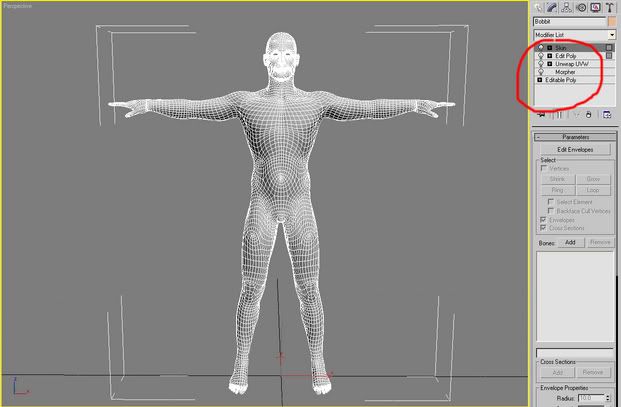
Warning for Animation 2 students: You must delete the Skin Modifier from the stack before you add the UVunwrap otherwise Max 8 will crash everytime due to a bug in Max.
After you have an Editable Poly for your male and/or female character you can then lay down a Morpher from the modifier list. After that you can lay down a UVunwrap and then you can throw down an Edit Poly Modifier from the Stack New to Max 8 along with the new UVunwrap which is not the same as the old UVunwrap in 6. Once in Edit Poly you can do M-Smooths which will allow you to divide the mesh to a higher detail level than previously possible. This will allow you to also gain access to the morph targets from the stack below transfering up to the more detailed model above eliminating much of your work needed for creating a whole bunch of new Morph Targets for the high res detail model and/or makes it much easier to just detail up a 2nd set for high poly morph targets because most of the work has already been done. With these edit polys it is possible now to sculpt on a low subdivision surface and affect the higher subdivision surface. Also this allows you to create one set of skin targets for both low poly and high poly models. So this new workflow I have just come up with really saves the Character Animation people a lot of work. :) ;) If you have further questions about this workflow email me or come see me or wait till class and ask all the questions that you want.
3D Animation 1&2 and 3D Modeling Class. So this is for Facial Animation and modeling. Its a website that shows you all of the facial expressions along with the muscles and bones to go along with it. Remember the muscles of the face are different from the rest of the body in that they are directly connected to the skin. You Will find this very useful for finishing their facial Morph Targets and others are still just starting.
Facial Muslces and Expressions.
http://www.artnatomia.net/uk/index.html
For Animation 2 and 3D Modeling Class:
Max Environment Builder:
http://www.highend3d.com/news/software/40.html
For Animation 1 Rigging How To:
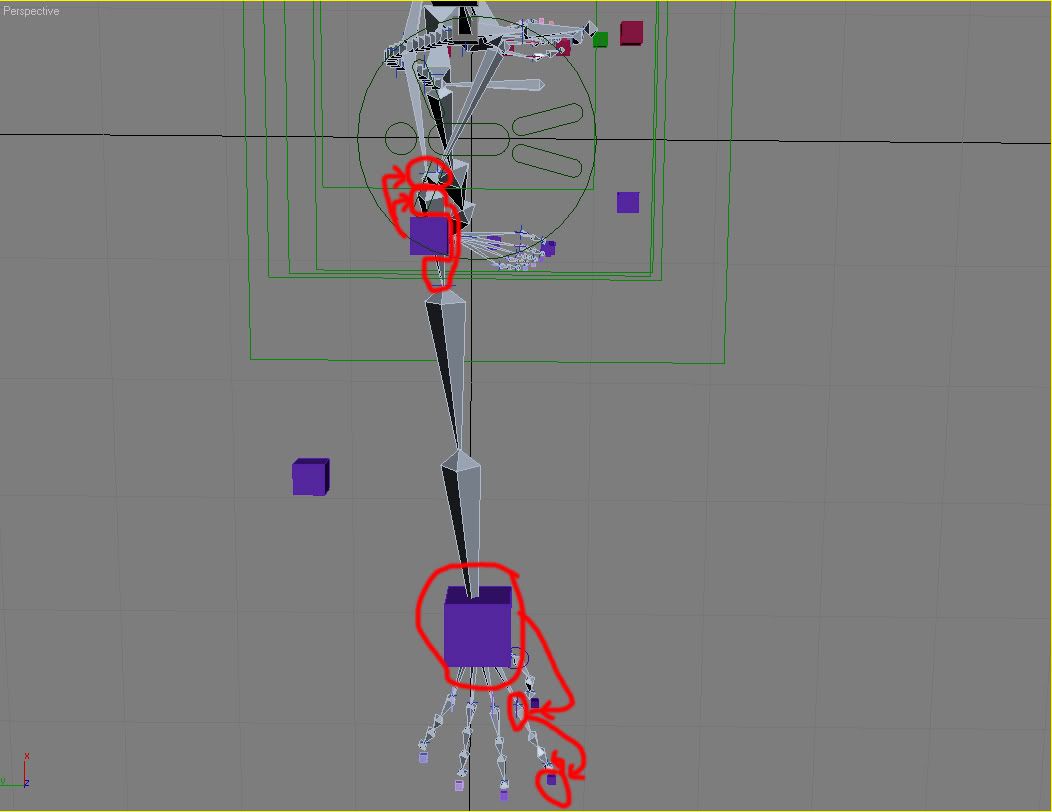
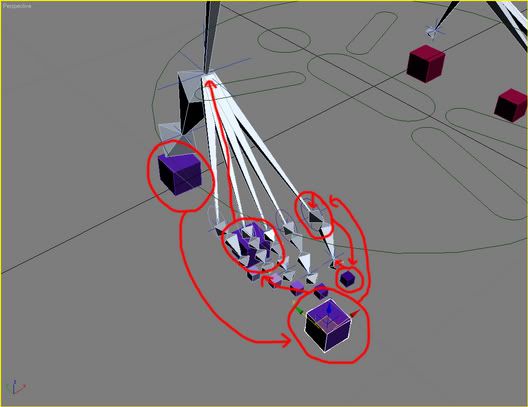
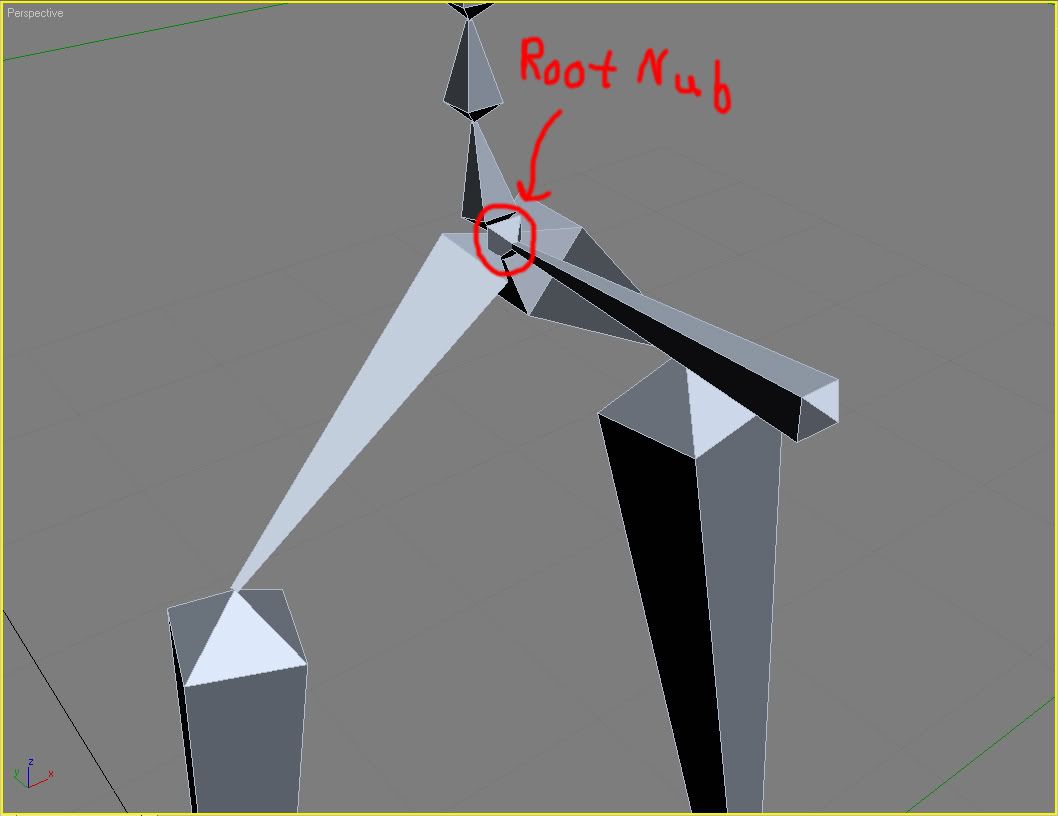
The circles are the parents and the arrows go to the child for the relationships. Remember that you drag the connect tool from the child to the parent when setting up relationships.
For Students that have never had me as their instructor:
Max Environment Builder:
http://www.highend3d.com/news/software/40.html
ZBrush Addons and Models:
http://206.145.80.239/zbc/showthread.php?t=020709
http://206.145.80.239/zbc/showthread.php?t=029628
http://206.145.80.239/zbc/showthread.php?t=030015
http://206.145.80.239/zbc/showthread.php?t=029789
http://206.145.80.239/zbc/showthread.php?t=003721
http://206.145.80.239/zbc/showthread.php?t=003471
The Homework www.3dbuzz.com 3D Studio Max issues 1-6. You must sign up for a user name and this process is free. Then click on the downloads section, and say I agree to the conditions page. Then on the left you will see an icon that says 3DS Max. Click on the icon and download all the videos from issues 1-6 or burn them off from CD from the lab from our file server at \\071fs\C-Share\MM Files\Movies Then go to the 3D Max folder and burn off all of the video tutorials to about 7 CDs. Unzip them with winrar and watch them with the Xvid Divx codec. You can use Microsoft Media Player to watch the videos.
You will need XVid to watch the 3D Buzz Videos:
http://download.divxmovies.com/XviD-1.0.3-20122004.exe
You will need Win Rar to unzip the 3D Buzz Videos:
http://www.rarlab.com/rar/wrar350.exe
HDRI 3D Studio Max Tutorial:
http://www.xedium3d.com/tutorials/hdri/hdri.html
HDRI Images:
http://hdri.3dweave.com/library/
http://www.debevec.org/Probes/
3D Studio Max User Forum:
http://forums.facepunchstudios.com/showthread.php?p=354782&highlight=lounge#post354782
3D Studio Max Demo Videos:
http://usa.autodesk.com/adsk/servlet/item?siteID=123112&id=5903856
http://usa.autodesk.com/adsk/servlet/item?siteID=123112&id=5663188
http://usa.autodesk.com/adsk/servlet/item?siteID=123112&id=5659402
Free ZBrush Videos:
http://pixologic.com/zbrush/class/classroom.html
Good Animation Videos:
http://www.rsad.edu/portfolio/ca.php
Links:
www.cgtalk.com
www.cgchannel.com
www.highend3d.com
www.3dbuzz.com
www.thegnomonworkshop.com
www.digital-tutors.com
www.3dtutorial.com
www.simplymaya.com
www.simplylightwave.com
www.alias.com
www.autodesk.com
www.softimage.com
www.pixelogic.com
www.newtek.com
www.sidefx.com
www.odforce.net
www.visualparadigms.com
www.xsibase.com
www.deviantart.com
http://www.thedesignworld.com/
Good art books for concept character art and also they are wonderful for 3D Modeling, Texture Painting, and Rigging.
1 An Atlas of Anatomy for Artis $10.36 1
1 Drawing the Human Head $13.57 1
1 Dynamic Anatomy $15.72 1
1 Dynamic Figure Drawing $13.57 1
1 Dynamic Wrinkles and Drapery $15.30 1
1 The Figure in Motion $13.57 1
1 Artistic Anatomy $15.72 1
1 Drawing Dynamic Hands $13.57 1
1 The Artist's Complete Guide t $22.05 1
Reference for Human Anatomy:
http://www.reybustos.com/04er/er.html
http://www.reybustos.com/03ra/ra.htm
Spore the First Fully Procedural Game:
I had this sent to be by some industry friends of mine. This was shown off at the GDC aka Game Developer Conference. Looks like it is the first fully procedural game. Really really amazing stuff. Also looks like he has a bunch of artifical life coding which is a branch of AI Artifical Intellegence. Very very cool. Massive that was used for Lord of the Rings had a lot of Artifical Life in it with generations and what not for all the crowd simulations of the orcs and other creatures and people. Check out this game video its about 35 minutes long it will blow your mind. :) ;)
http://video.google.com/videoplay?docid=8372603330420559198&q=spore
The first fully interactive Epic Fantasy Adventure set in First Person Shooter style game play. Their game engine is being developed by one guy and he is a really really good programmer. The engine looks amazing and so does the art work coming out of these artists. Their art pipeline is XSI - ZBrush.
New game engine being developed in GA that is for entry level game developers and up. It has 0 setup costs which is wonderful and unheard of. You have to understand that most game engines cost $1,000,000 to use and on the low side VirTools at $100,000. So it costs a bit of money to make a game normally. Kaneva is different you get paid royalities on your games that you make with their engine and you can even sell them on their site which is very nice. Max is fully supported along with Blender, Maya, and Lightwave.
http://www.kaneva.com/overview/KEPEditor.aspx?ttCat=create&subtab=myg
http://www.kaneva.com/create/create.kaneva
Below is the link to how to move models and the UV Mapping from your low poly character into zbrush from max and from zbrush into max. I think what we are going to do is just throw down a displacement modifier and just use the normal mapping for the surface shading in addition to the displacement mapping. That should give us a pretty good look. Students not using ZBrush will just have to rely on Normal Mapping for the higher detailed characters so we just won't get the range that we had hoped for with Max 8 do to way too many bugs with the Poly Edit modifier. People that use ZBrush can do the facial animation shapes in ZBrush and export them out as displacement maps and normal maps and we can animated between the different maps and you will gain extremely accurate detail and very nice animation setup. We can tie them to a single set of controls. Contact me if you have any questions on this.
http://pixologic.com/zbrush/class/zpipeline.html
Due to popular request and the fact that I am getting asked this question over and over. What is a good notebook computer that is within my price range for animation and where can I get a good small USB drive.
60 Gig USB 2.5 inch Seagate Hard Drive:
http://www.ewiz.com/detail.php?name=ST96812A
You can pick up the case for it at Micro Center for about $20. Don't buy the more expensive case that can handle a terrabyte drive because they don't exist to start with. The fastest one out that just came out is 250 gigs in a USB 2.5 inch drive. So it will probably be a few years before they ever reach a terrabyte. ;) :) Also don't worry about drives that 7200 speed v. 5400 speed because both are faster than the actual USB so it really doesn't matter. You can't send data back and forth faster than the USB Cable 2.0 standard.
A good Notebook Graphics Tablet Computer for Multimedia for a good Price:
http://www.highend3d.com/articles/reviews/21.html
http://www.zipzoomfly.com/jsp/ThirdCategoryList.jsp?SecondCategoryCode=0318
http://www.wacom.com/tabletpc/comparison.cfm
Workstations:
http://www.monarchcomputer.com/Merchant2/merchant.mv
High Grade Hard Drives for Workstations:
http://www.monarchcomputer.com/Merchant2/merchant.mv?Screen=PROD&Store_Code=M&Product_Code=150157&Category_Code=SATAHardDrives
Much Better Faster Drive 2 Times the Cache really matters a lot.
http://www.monarchcomputer.com/Merchant2/merchant.mv?Screen=PROD&Store_Code=M&Product_Code=150467&Category_Code=SATAHardDrives
High Performance Notebooks:
http://www.dell.com/content/products/compare.aspx/precn_m?c=us&cs=555&l=en&s=biz
http://www.alienware.com/
http://www.boxxtech.com/
Another Place for Hardware:
http://www.ewiz.com
Cheers,
Nate Nesler
posted by Nate at 11:58 AM


0 Comments:
Post a Comment
<< Home